


Ti.Live-Chill & Stream
4.6270.00 Reviews
App Specs
- Version
- 2.1.0
- Updated On
- License
- Free
- Downloads
- 5,000,000+
- Developer
- Ti.Live Team
- Categories
- Social
- Platform
- Android
Screenshots


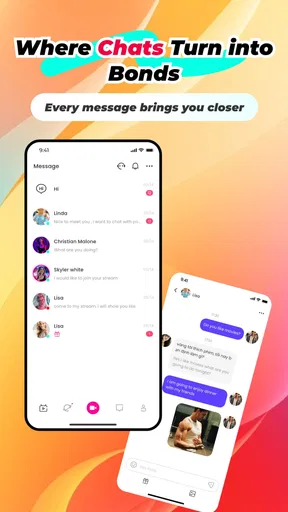

 Analysis by AppCompare
I like the idea behind Ti.Live-Chill & Stream: it brings live broadcasting and casual viewing together, so I can either join a conversation or simply browse when I have a few spare minutes. That flexibility is its clearest appeal. I would recommend it to someone curious about social livestreaming, but not to anyone expecting a polished, tightly curated service where every session has a predictable topic or format.
As a social app from Ti.Live Team, it sits in a different lane from private messaging and conventional social feeds. The focus is real-time presence: people can share live moments and viewers can respond while they happen. That can make a small, informal broadcast feel more immediate than posting a clip and waiting for reactions. It also means the experience depends heavily on who is online and what they choose to share at that moment.
A format that rewards participation
The most appealing part of live social viewing is the possibility of an actual exchange rather than a one-way video. If I’m watching someone talk about a hobby, I can follow the conversation as it develops instead of treating the stream like a finished upload. For a creator, that same immediacy can make a casual chat feel welcoming without requiring a carefully edited production.
There is a trade-off, though: live content asks for attention at a particular time. A conventional feed is easier to dip into and leave whenever I want, while a stream can feel less satisfying if I arrive late, find little conversation, or simply don’t connect with the person broadcasting. I’d treat it as an option for spontaneous interaction, not as a replacement for every kind of social app.
Where it fits into an ordinary day
Imagine that I have a short break after dinner. I could open the app, look for a live session that interests me, and watch for a few minutes without needing to plan an entire evening around it. If the discussion feels comfortable, I might add a comment; if I’m not in the mood to participate, passive viewing is a perfectly reasonable way to use a live platform.
For someone who wants to try broadcasting, a sensible first step is to keep the opening simple: choose one topic, say what viewers can expect, and leave room for people to respond. A live session does not need to feel like a performance. In my view, that low-pressure approach suits the social appeal better than trying to imitate a professional show before you know what kind of conversations your audience enjoys.
It is also worth deciding in advance how much of your personal life you want to share. A live audience can make ordinary details feel more public than they seemed while you were setting up. I would keep identifying information and private routines out of a casual broadcast, and think before turning a spontaneous moment into something shared with strangers.
Worth Reading Before You Choose

EA SPORTS FC Mobile 26 Is a Bigger Football Game, but It Takes Time

Flipboard Shows What News Apps Must Do Beyond the Feed

Switching to Android Auto Means Rethinking Your Driving Routine

Google Calendar Makes a Crowded Week Easier to Manage

Ludo King Makes the Most of the Minutes Between Plans

Baby Panda World Brings Quick Play to Modern Phones, but Its Game Library Feels Busy
How it compares with familiar social options
Compared with a standard social network, a livestreaming app puts more weight on being present at the same time as other people. A feed is usually better for polished updates, asynchronous replies, and catching up later. A one-to-one messaging app is better when the conversation is private or needs a clear recipient. Ti.Live’s appeal is the middle ground: an open, live social setting for people who want a more immediate exchange.
That middle ground will not suit everyone. If I mainly want to keep in touch with a small circle, a private group chat is more direct and less exposed. If I want videos that are easy to revisit, recorded or edited content is more convenient than a live session. I would choose this app when the social timing itself is part of the point, not when I need a searchable archive or a controlled conversation.
Getting Started with Ti.Live-Chill & Stream
The first thing you need to do is download the app, which is available on both Android and iOS. The installation process is quick and painless—just a few taps, and you’re ready to roll. As soon as you open the app, you’re greeted with a sleek, user-friendly interface that’s easy to navigate. It’s like they read my mind and designed it specifically for people like me who love straightforward layouts. No frills, just functionality!
The app is free to download, and its Teen age rating is a useful reminder that it is aimed at a younger audience than an adults-only service. I would still use the usual care with public social spaces: be thoughtful about what you share, and don’t assume that a friendly exchange means you know someone well. It has an average rating of 4.7 from around 26,000 ratings, alongside more than 200 written reviews, and has passed five million installs. Those figures suggest that it has found an audience, though they cannot tell me whether a particular stream will be engaging or whether its community suits me.
Ti.Live was released on December 27, 2024, and version 1.9.1 is the current release. It supports Android 7.0 and later, which makes it accessible to people who are not using the newest Android version. On iOS, I would check the app’s current compatibility in the relevant store before installing, especially if I use an older device. That quick check is more useful than assuming that a social app will run identically across every phone.
Features That Make Ti.Live Shine
Now, let's talk about features. Ti.Live-Chill & Stream is packed with tools that make livestreaming not just easy, but also a whole lot of fun. Whether you’re a seasoned streamer or a newbie, this app has something for everyone.
1. Interactive Streaming: The app allows you to interact with your audience in real-time. Viewers can send you messages during the stream, and you can reply instantly. It feels like having a conversation in your living room but with people from every corner of the globe.
For a viewer, I’d use comments selectively rather than trying to follow every message at once. Live chat can move quickly, and responding to everything can pull attention away from the person on screen. For a streamer, asking one clear question at a time is a practical way to make participation easier: viewers can understand what the conversation is about and decide whether they want to join in.
2. Gifts and Rewards: One of the coolest features is the ability for viewers to send virtual gifts. These gifts can be converted into real currency, giving you more incentive to keep your audience engaged and entertained.
Virtual gifts are best treated as a social extra, not a reliable income plan. A viewer may enjoy sending one, but I would not start streaming on the assumption that gifts will cover expenses or arrive consistently. If I were watching, I’d also set myself a personal spending limit before buying anything: small in-app purchases can add up when they are tied to live reactions and social pressure.
The app is free, while optional in-app purchases range from $0.99 to $99.99 per item. That spread makes it especially sensible to check the cost before confirming a purchase and to avoid spending just to keep up with other viewers. I see the free starting point as a plus, but the presence of paid items means the experience is not necessarily cost-free for someone who chooses to buy gifts or other extras.
3. Customizable Profiles: You can make your profile as unique as you are. Add a bio, link your social media accounts, and personalize your page to reflect your personality. It’s a great way to attract more viewers and let them know what you’re all about.
A useful profile does not need to reveal much. I’d describe the kind of streams I plan to host and use a name or image I’m comfortable showing publicly, rather than adding personal details simply to appear more approachable. If linking another social account is an option, I would consider whether I really want viewers moving between those spaces before connecting them. A clear, modest profile can set expectations without blurring the line between a public persona and private life.
4. High-Quality Streaming: Nobody wants to watch a pixelated video, right? Ti.Live ensures your streams are of the highest quality possible, with minimal lag and interruptions. Your viewers will appreciate the smooth experience, and you’ll look like a pro.
Whatever the intended quality, a live broadcast still depends on the phone and connection being used. I would test a short session before planning a longer one, check that I can hear and be heard, and avoid starting a stream somewhere with an unreliable connection. That small rehearsal is a practical way to catch basic problems without turning a casual first broadcast into a stressful event.
Community matters more than the feature list
What sets Ti.Live-Chill & Stream apart from other livestreaming apps is its community vibe. You’re not just streaming; you’re joining a community of like-minded people who are there to support you. The app encourages you to explore different streams, interact with other users, and build connections.
For me, the strength of a social live app is not a long checklist of tools but whether I find people I want to hear from again. I’d spend time sampling different sessions before deciding whether the community feels right. A friendly first broadcast can be encouraging, but the quality of the experience will vary with the users who are active, the subjects they choose, and the tone of the conversation.
That variability is a real limitation. Live platforms can have quiet stretches, streams that do not match my interests, or conversations I would rather leave. I would not assume that every session is moderated to my preferences or that every interaction will feel comfortable. If a stream makes me uneasy, leaving is a better choice than feeling obliged to stay or respond.
It also helps to approach the app with a specific purpose. I might open it to find a relaxed conversation, watch someone share a skill, or test whether I enjoy hosting a short live chat. Opening it with no idea what I want can make browsing feel aimless, particularly if the available sessions do not immediately catch my attention. A small goal makes the time spent there feel more intentional.
Chill viewing and the right expectations
Another thing I love is the Chill part of the app. It offers a space where you can relax and watch other people’s streams without any pressure to engage. Whether you’re into music, gaming, or just want to see what people are up to, there’s always something interesting to watch. It’s like having access to a never-ending source of entertainment.
I’d keep the “watch without pressure” idea in perspective: browsing can be relaxing, but live content is still unpredictable. A stream may not hold my interest, and I may need to move on rather than wait for it to become entertaining. That is why I see this as a good app for curious, flexible viewers, not necessarily as a dependable source of a particular show or topic at a fixed time.
It is also a different habit from watching a creator’s edited videos. Edited clips are easier to fit into a schedule and tend to get to the point; live sessions offer the chance of an unexpected moment or direct exchange, but they can include pauses and digressions. If I want a quick answer or a carefully structured tutorial, I would choose a search or video platform instead. If I want to feel present in a shared moment, live viewing has the advantage.
Who I would recommend it to
I’d recommend Ti.Live to people who enjoy the social side of livestreaming and are comfortable with an open-ended experience. It may suit someone who wants to try hosting without first building a production setup, or a viewer who likes sampling informal live conversations. The most likely fit is a person who values interaction and discovery more than a perfectly organized catalogue.
I would suggest skipping it if you dislike public social interaction, prefer conversations limited to people you already know, or want every video to be short and edited. It is also a poor match if you expect consistent earnings from streaming or want to spend without thinking about the cost of virtual gifts. In those situations, messaging, recorded video, or a more structured creator platform may serve you better.
Parents and younger users should take the Teen rating seriously as a guide to intended age, not as a reason to ignore normal online caution. I would talk through what is appropriate to share, how to handle unwanted contact, and when to leave a conversation. For anyone, a good rule is to keep private details private and treat live attention as a reason to be more deliberate, not less.
Final Thoughts
All in all, Ti.Live-Chill & Stream is more than just another streaming app; it’s a platform that brings people together. Whether you’re here to stream, watch, or just chill, you’ll find that this app has a little bit of everything. The easy-to-use interface, combined with the robust set of features, makes it a must-have for anyone interested in livestreaming.
I’d soften that recommendation to “worth trying” rather than “must-have.” The app’s social format is appealing when I want a live exchange or a relaxed browse, but it cannot guarantee that the right conversation will be waiting whenever I open it. The free download lowers the barrier to exploring it, while optional purchases and the unpredictable nature of live content are reasons to set sensible expectations from the start.
If you’re looking to dip your toes into the world of livestreaming or just want to find a new way to connect with people, give Ti.Live a shot. You won’t be disappointed!
Pros
- User-friendly interface for easy navigation.
- High-quality streaming with minimal lag.
- Interactive features enhance engagement.
- Wide variety of content to explore.
- Customizable notifications for live events.
Cons
- Occasional ads disrupt viewing experience.
- Limited offline content availability.
- In-app purchases can be pricey.
- Requires strong internet for best quality.
- Some features locked behind a paywall.
FAQs for Ti.Live-Chill & Stream
What is Ti.Live-Chill & Stream and what can I do with it?
Ti.Live-Chill & Stream is a versatile app designed for users who enjoy streaming and socializing. It allows you to broadcast live video, interact with viewers in real-time, and join communities with similar interests. The app also enables you to discover new content, follow favorite streamers, and participate in live chats.
Is Ti.Live-Chill & Stream free to use or are there any in-app purchases?
Ti.Live-Chill & Stream is free to download and use, offering a range of features accessible at no cost. However, it also includes in-app purchases for premium features such as ad-free streaming, special effects, and exclusive content. These purchases enhance the overall user experience but are not necessary for basic functionality.
What devices are compatible with Ti.Live-Chill & Stream?
Ti.Live-Chill & Stream is available on both Android and iOS platforms. It is optimized for a wide range of devices, ensuring smooth performance on smartphones and tablets. To ensure compatibility, check that your device meets the minimum operating system requirements specified in the app store.
How secure is my data on Ti.Live-Chill & Stream?
Ti.Live-Chill & Stream prioritizes user privacy and data security. The app employs encryption and complies with relevant data protection regulations to safeguard your personal information. Users are encouraged to review the app's privacy policy for detailed information on data handling and to adjust privacy settings according to their preferences.
Can I interact with other users on Ti.Live-Chill & Stream?
Yes, Ti.Live-Chill & Stream emphasizes community interaction. You can chat with viewers during live streams, join group discussions, and follow other users. The app provides tools to manage interactions, including blocking or reporting inappropriate content, ensuring a positive and safe community environment.


